
Your PC is slowing you down, and in 2026, there’s absolutely no reason to put up with it. Slow load times, jerky frame rates, and programs that stop working in the middle of a job are frustrating. The good news? There’s no need to get a new machine. Upgrading the right PC components can make a huge difference in its speed, stability, and performance, and it can often be done for a lot less money than buying a whole new system.
Whether you’re a gamer in Manchester who wants faster frame rates or an editor in London who uses powerful software, targeted upgrades make a big difference. This guide shows you exactly what to upgrade, in what order, and how to avoid the most common mistakes.
Why Upgrading Your PC’s Key Components Still Makes Sense in 2026
The tech industry moves quickly. Every year, software demands more. In 2022, a computer that could handle everything might not be able to handle modern games, creative tools, or even everyday browser tasks today.
That’s not always the smart thing to do. By strategically upgrading certain PC components, you can give your current setup many more years. You waste less, spend less, and still get the speed boost you want.
Here’s why 2026 is a particularly good time to upgrade:
- DDR5 RAM processors have dropped significantly
- Now, PCIe 5.0 NVMe SSDs are common and cheap.
- High-end GPUs can now compete with yesterday’s top-of-the-line cards
- A refurbished gaming PC offers a brilliant, cost-effective base to build from
Which PC Components Deliver the Biggest Performance Gains?
Every update will change things in different ways. The important thing is to find the part of your system that’s holding everything else back.
Identifying the GPU: Your Visual Performance Engine
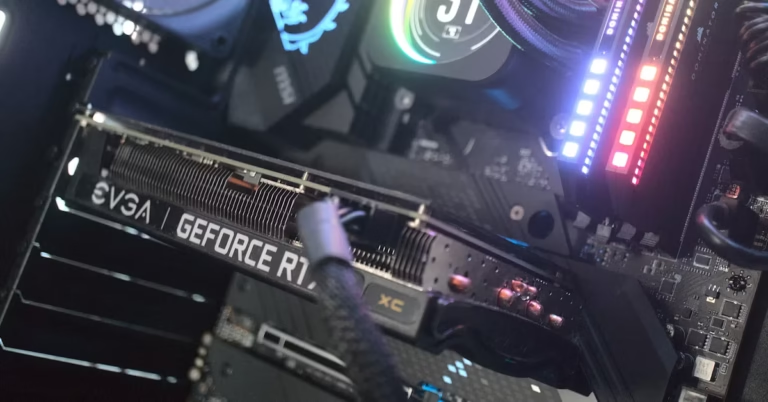
For games and visual work, the graphics card is the most important part. The GPU is likely to blame if your games stutter, textures take a long time to load, or your editing software slows down when displaying.
In 2026, mid-range graphics cards can do things that high-end cards could only do a few years ago. Before you upgrade, you should always check:
- Your power supply unit’s wattage and connector types
- The size of your PC case and how much GPU space you have
- Your monitor’s resolution matches the GPU tier accordingly
Upgrading RAM: More Headroom, Better Multitasking
DDR4 is still used in a lot of computers. When you switch to DDR5 RAM, you’ll notice big changes in how quickly you can switch between tasks and how quickly apps respond. For most users, 16GB is the practical minimum in 2026. Gamers and content creators should aim for 32GB.
Before you buy, you should always check what RAM speeds your system can handle. One of the most common update mistakes that is easy to avoid is putting in RAM that doesn’t work with your computer.
Storage Upgrades: The Fastest Win Available
If you still have a regular hard drive, getting an NVMe SSD will be the most obvious way to improve your computer. Boot times, game start screens, and file transfers all get a lot better.
| Storage Type | Approx. Read Speed | Best Use Case |
| HDD | ~120 MB/s | Bulk or archive storage |
| SATA SSD | ~550 MB/s | Budget-friendly upgrades |
| NVMe PCIe 4.0 | Up to 7,000 MB/s | High-performance builds |
| NVMe PCIe 5.0 | Up to 12,000 MB/s | Cutting-edge workstations |
CPU Upgrades: When the Processor Becomes the Bottleneck
You may not be getting as much done as you could if your graphics card is new, but your CPU is several years old. A newer CPU with higher core counts handles multithreaded tasks far more efficiently.
Before you buy a new CPU, make sure that the socket will work with the system you already have. Often, getting a new motherboard is necessary along with an upgrade to the CPU. Include this in your budget.
Cooling: The Overlooked Performance Multiplier
The speed killer that no one hears is thermal throttling. If your CPU or GPU gets too hot, it will automatically reduce its clock speed to cool down. Whether it’s a good air cooler or an AIO liquid cooler, better cooling keeps parts working at their best.
People often don’t update their cooling until it’s too late, but it can make your machine run faster than it was before.
Is a Refurbished Gaming PC the Smarter Starting Point?
For many people, the best upgrade path doesn’t start with a single component; it starts with a better base machine
A refurbished gaming PC has hardware that has been tested by professionals and is sold at a much lower price. Instead of trying to get an old system to run faster, you build a strong base and then upgrade individual PC parts from there.
This approach works particularly well if:
- Your current machine is more than five years old.
- Multiple components need replacing at once
- You want a well-built system with a guarantee, but don’t want to pay the full price of a new build.
Refurbished doesn’t mean second-rate. In the year 2026, trustworthy sellers test and approve restored systems that meet strict requirements. It’s a practical, environmentally friendly choice that’s becoming more and more popular in the UK.
Veno Scorp has both carefully chosen individual PC components and high-quality refurbished gaming PCs in stock. This gives you a lot of choices, whether you want to upgrade piece by piece or start fresh with a tested system.
The Right Order to Upgrade Your PC Components
When you upgrade in the wrong order, you lose money. For the best results, do these things in this order:
- Run a benchmark: UserBenchmark and HWiNFO are two tools that can help you find your real problem.
- Set a realistic budget: Know your ceiling before browsing
- Upgrade storage first: Highest impact, lowest cost
- Replace or add RAM: If your system does a lot of different things at once,
- Upgrade the CPU or GPU: Based on your primary use case,
- Improve cooling: Essential if temps are slowing things down
Mistakes to Avoid When Choosing New PC Components
This is where even skilled builders go wrong:
- Ignoring compatibility: Always check form factors, socket types, and chipset support
- Underestimating the PSU: A weak power supply limits what your whole build can do.
- Skipping thermal paste: Always apply fresh paste when reseating any CPU cooler
- Chasing specs over value: A mid-range build that works well beats a high-end build that doesn’t work well.
A whole system can be slowed down by one poorly chosen part. Do a lot of research and don’t make a choice right away.
Don’t Let an Outdated PC Hold You Back Any Longer
Every day you wait, your performance will slow down, you will miss frame rates, and you will lose time. You can get the parts you need right now, and it’s easier than you think to upgrade.
When you need to add a single PC component to run an existing build or upgrade to a refurbished gaming PC as your new base, Veno Scorp makes it easy to find quality hardware built for real performance in 2026.
Browse the full range today and start building the PC your work and your games actually deserve.
