
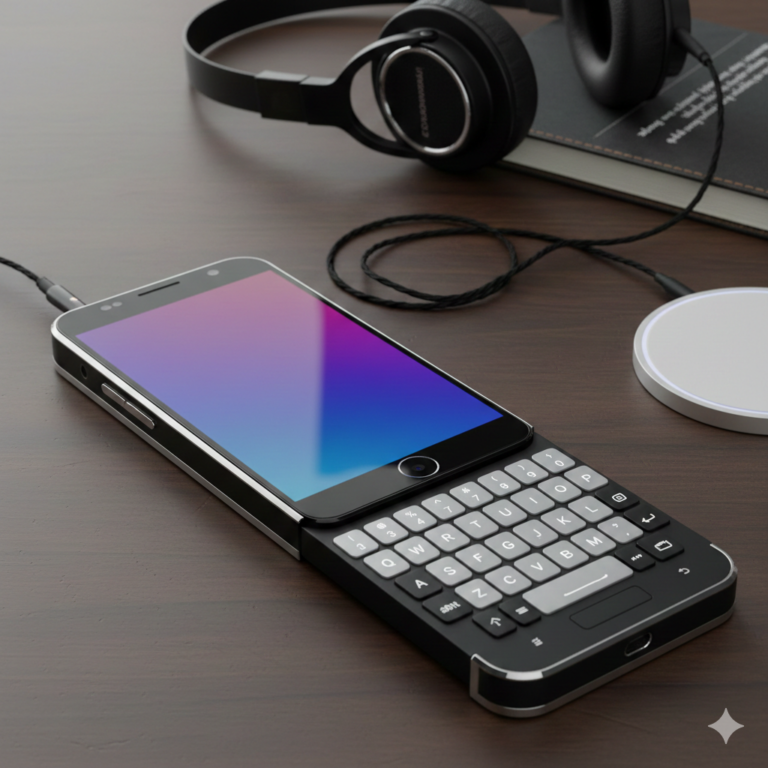
Look, typing on a flat glass screen? Total nightmare. It’s pretty familiar, right? You are out for a walk, trying to send a quick work email, and suddenly, autocorrect makes you get embarrassed. Zero feedback whatsoever. Just tapping cold glass and hoping you hit the right letters.
My old phone had real buttons. I could text without looking, even had it down under the table in boring meetings. The Clicks Communicator Phone wants to bring that back. Not just for nostalgia’s sake either. There’s this whole movement now toward phones that help you actually communicate and message people, not just scroll TikTok for three hours. It’s for people who want to handle business and then actually live their lives.
Bringing Back Real Keyboards
Nobody wants to admit it, but typing on glass? Never been great. Tap a touchscreen, and there’s nothing. No feedback.Because you keep looking at the keyboard to make sure that you are tapping the right keys, not only do you do that more slowly, but it also becomes more difficult.
The Clicks Communicator Phone does something different: it brings back the physical keyboard. And here’s why that matters: muscle memory. After a few days, your fingers just know where the keys are. Type without looking. Each press gives you that little confirmation. Feels way more efficient.
This thing fits into what people are calling click communicators. Pretty simple idea: smartphones should be about communication first. Great at typing, calling, messaging, not just being portable Netflix machines. When you’ve got real buttons under your fingers, something shifts in how you use it. Open the phone, get your message out, and move on with your day.
Getting Back What We Lost
Phone companies spent the last few years ripping out features and telling us we didn’t need them. Headphone jacks disappeared overnight. Expandable storage? Forget about it. Everything had to be paper-thin, even if it made phones worse to use.
Clicks Communicator goes the other direction.
1. Real Audio Connections
Bluetooth fails at the worst times, right? Your wireless earbuds die mid-call. Connection drops for no reason. Audio lags behind the video you’re watching. This stuff happens constantly, not occasionally.
This phone’s got a 35mm headphone jack. You know, that round port that worked flawlessly for like 50 years. Any wired headphones, just plug them in. No adapter nonsense. Nothing extra is sitting on a charger. Zero compatibility issues.
If you’re on calls a lot or listen to podcasts all day, this actually matters. Wired connections sound better and don’t randomly fail. One less thing to worry about.
2. Actually Swapping SIM Cards
New phones are all about eSIM now. Digital SIM cards can be handy in some situations, but they’re a royal pain when you’re switching phones fast or traveling overseas.
Clicks Communicator keeps a physical SIM slot. Open the tray, drop in a regular SIM card. Same as always. Game-changer for travel, grab a local card at the airport, pop it in, and you’re connected. Skip the QR code dance. Skip waiting on hold with support. Just works.
3. Battery That Actually Lasts
They’re using this newer mah silicon-carbon battery tech. Lithium-ion batteries are good for the job, but they usually contain a lot of space. The mah siliconcarbon stuff packs way more energy into less space.
So the phone stays a normal size, but the battery capacity is really good. Handle emails, calls, and streaming music all day without hunting for outlets. No cable spaghetti everywhere, especially nice at night when you’re too tired to deal with it.
Pairing my silicon carbon with wireless charging means you basically never think about battery stuff anymore.
Software Designed for Professional Use
It runs Android, so all your regular apps work, WhatsApp, Spotify, Google Maps, and others. It can handle most of the stuff that you do every day without any problem, but the physical keyboard for work is definitely where it gets its power.
Establishing Work-Life Balance
Android’s got some pretty useful call management built in. If you’re using this for work, you probably don’t want client calls interrupting dinner with your family or late-night Netflix.
Setting up call forwarding on android is quick. Jump into settings, tell the phone to send calls elsewhere after work hours, maybe 6 PM or whenever. Send them to voicemail, forward to another number, whatever works.
The call forwarding options on Android are actually pretty flexible. Forward when you’re busy, route specific contacts differently, and make custom rules. Helps you set actual boundaries instead of being “on” 24/7.
Professional Communication Tools
Small business owners and remote workers can hook this up with modern cloud-based phone system setups. These give you business numbers that run over the internet instead of old-school phone lines.
That physical keyboard makes using a cloud-based phone system way easier. Type client names fast, punch in extensions without fighting disappearing number pads, and check your notes at the same time.
With AI jobs blowing up lately, mobile productivity matters even more. Remote folks managing AI projects or crunching data need solid communication devices that don’t constantly bug them or die halfway through the workday.
Your Daily Experience with Clicks Communicator Phone
The first few days might feel weird. Your thumbs are used to touchscreens and need time to remember physical buttons. But after that adjustment period, something clicks.
You start appreciating that little click and feel from every key. Text messages get longer—actual thoughts instead of just emoji strings. You check Instagram less because the screen’s a bit smaller (keyboard takes space), so mindless scrolling isn’t as tempting. After looking up more, you become aware of what is around you.
You can get in your car, plug the 35mm headphone jack into the aux port, and the sound quality is exceptionally good. At work, blast through emails with that physical keyboard. Your cloud-based phone system handles client stuff professionally.
Every night, toss it on the wireless charging pad without thinking. Morning comes, that mah siliconcarbon battery’s ready for another full day.
Is This Phone Right for You?
Choosing a new mobile phone is a very serious matter, particularly one that is so different in appearance. Here’s how to tell if that phone is for you:
- Keyboard Warrior:If your thumbs are getting nostalgic for the clicky, tactile feel of real buttons, then you will definitely love this. Once muscle memory kicks in, you’ll fly through emails faster than touchscreen typing ever let you.
- The “Dongle Life” annoys you:Tired of losing tiny adapters? Bluetooth headphones dying mid-call? Having that 3.5mm headphone jack back changes everything. Plug and play, simple as that.
- You’re a frequent flyer:Travel a lot? Physical SIM slot saves your butt. No more expensive roaming or buggy eSIMs, grab a local card at the airport, pop it in, done.
- You value boundaries:Between the physical keyboard and easy call forwarding on Android settings, this phone’s built for people who work hard but want to actually “switch off” at home with family.
- You need “All-Day” power:Silicon-carbon battery tech packs serious juice into a slim frame. If you’re constantly hunting for chargers by 4 PM, this’ll give you peace of mind.
Conclusion
Bottom line, the Clicks Communicator isn’t trying to be another boring glass rectangle. It’s kind of rebellious, actually. Brings back the stuff we genuinely miss, reliable audio, physical keys, while still packing modern tech like wireless charging and high-capacity batteries.
Gonna feel weird at first? Probably yeah. Your thumbs might need a couple of days to remember real buttons. However, after you return to the flow, most likely, you will be more productive and significantly less distracted. It’s essentially making your phone serve you rather than you being a slave to it.
