
A home security alarm system works better when it follows the house instead of the bundle on the shelf. Start with how someone could get inside, where they would likely walk next, and which doors your family uses every day. That kind of home alarm sensor planning reduces blind spots and nuisance alerts; this guide covers entry points, movement paths, home security alarm zones, daily modes, and buying choices before anything goes on the wall.
Table of Contents
- Plan Your Home Security Alarm System Around Entry Points
- Use Motion Sensors to Cover Interior Movement Paths
- Place the Hub and Keypad for Reliable Daily Use
- Set Home Security Alarm Zones Based on Daily Routines
- Choose Entry and Motion Sensors After the Layout Is Clear
- Expand the System Without Overbuying Sensors
- Conclusion
Plan Your Home Security Alarm System Around Entry Points
Begin with the openings a person could reach without much effort. Entry sensors handle the moment a door or window changes from closed to open, so walk through your own house and ask which one someone would try first, the front door, the side gate, a basement window, or the garage entry.
- Primary doors: The front door, back door, and entrance your family uses most deserve early coverage because they are used often and easy to test.
- Sliding doors: Patio doors and older tracks need a closer look, especially when rear access is hidden from the street.
- Garage access: If the garage entry opens into a hallway, kitchen, or mudroom, treat it like part of the house rather than a storage-area afterthought.
- Reachable windows: Ground-floor, basement, and side-fence windows move up the list when they are easy to reach and hard for nearby homes to see.
This keeps the first purchase focused. A small house may need only a few entry sensors to cover its real risk points. A larger home may need more, but the reason should come from the layout rather than the size of a bundle.
Use Motion Sensors to Cover Interior Movement Paths
With the obvious openings covered, the next question is where someone would go if they got inside. Entry sensors catch the opening; motion sensors watch the paths inside the house. Bedrooms, stairs, offices, electronics, and connecting hallways usually tell you more than empty corners.
A motion sensor in every room sounds thorough until the alerts start. Pets, sun, vents, and moving curtains all add noise. Better home alarm sensor planning usually means covering the few chokepoints people have to cross.
| Area | Why it matters | Planning note |
| Main hallway | Connects bedrooms and living spaces | One sensor may cover several rooms indirectly |
| Stair landing | Controls movement between floors | Useful when bedrooms are upstairs |
| Garage entry path | Links storage areas to the home | Works best with a door sensor nearby |
| Long open room | May be crossed after a rear entry | Avoid aiming at windows with strong sunlight |
Even the right room fails with a bad mount. Keep motion sensors away from heating vents, direct afternoon sun, fireplaces, and moving curtains. Passive infrared sensors react to heat changes, so the wrong angle can make a quiet house look busy. If pets move freely, plan around their favorite routes before putting hardware on the wall. For homes that need a dedicated room or hallway detector, add motion detection only after the layout shows where it is actually needed.
Place the Hub and Keypad for Reliable Daily Use
The hub and keypad decide whether the system is easy to live with day to day. The hub needs a stable connection and a spot that is not visible from an entry door. The keypad needs to sit near the entrance that the family actually uses.
Hub Placement
A front table may feel convenient for the hub, but it is often too visible. A middle room, office shelf, media cabinet, or closet near the router usually makes more sense. The exact spot depends on the wireless range and power needs of the system, but the principle is simple. Give the hub a steady connection and keep it out of the first line of sight from the door.
Keypad Placement
The keypad should sit where people naturally pause on the way in or out. In many homes, that is the garage, mudroom, or side entry, not the formal front door. Put it too far from the normal route, and the problem shows up on an ordinary evening, with groceries in one hand and the countdown beeping from another room.
Good placement should feel uneventful. The system gets armed, disarmed, and left alone.
Set Home Security Alarm Zones Based on Daily Routines
Home security alarm zones are where the plan starts to meet daily life. The same sensors may need to behave one way when the house is empty and another way when people are asleep upstairs. Without that split, the system can feel either too relaxed to trust or too strict to keep armed.
- Away mode: This is usually the strictest setup. Doors, windows, hallways, stairs, and empty rooms can stay watched while everyone is at work, school, errands, or away overnight.
- Home mode: The outer shell stays protected, but indoor movement needs breathing room. Door and window sensors can remain active while kitchen, living room, and bedroom motion rules are relaxed.
- Sleep mode: Night settings depend on the household. Doors, accessible windows, the garage zone, and a downstairs motion sensor may stay active, while upstairs movement is ignored unless downstairs activity after bedtime would be unusual.
Test these modes before relying on them. Open the garage entry, walk from bedroom to bathroom, let the dog follow its normal path, and check whether the alerts match real life. A few small changes now are easier than a month of nuisance alarms.
Choose Entry and Motion Sensors After the Layout Is Clear
Buying comes after the map. Count the entry points that need contact sensors, mark the movement paths that need motion detection, and decide where the keypad should sit. Once the entry-point map is clear, the eufy door alarm sensors can help you choose sensors for the doors, sliding doors, and reachable windows that actually need coverage. If you are choosing an alarm system for house-wide coverage, the first purchase should still match the plan rather than replace it.
A rough sensor count can make shopping easier to start. A 2-bedroom apartment often has around three to five entry sensors plus one motion sensor. A 3-bedroom single-story home may need more coverage around the garage, patio, and side window access. Actual needs still vary by layout, sightlines, pets, and which doors the household uses every day.
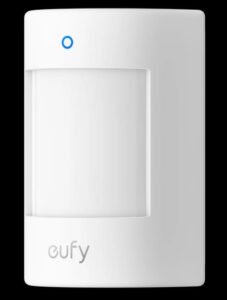
For a smaller home or first setup, the eufy Motion Sensor E20 makes sense when the layout shows a hallway, stair landing, or main crossing path that needs motion coverage. Its 90° field of view and 26 ft detection range can cover a key indoor path without placing a sensor in every room, while pet-friendly detection for pets under 80 lb helps reduce nuisance alerts in everyday use. Its 5-year battery life supports a low-maintenance setup. With a compatible HomeBase™, the sensor can deliver dependable alerts over an open-air range of up to 656 ft (200 m).
After the first entry or motion sensor is chosen, the map is still useful. The next gap might be a garage entry, a hidden patio-side window, or a hallway that links several rooms. Sometimes it is not another sensor at all. A keypad sitting too far from the door your family uses every day can create the same kind of daily friction.
Expand the System Without Overbuying Sensors
Many alarm systems become harder to use because they grow without a plan. A sensor gets added after one worry, then another after a sale, then another because a larger pack looked cheaper. Six months later, no one remembers which alert belongs to which area.
Expand in small steps. Add sensors where testing exposes a real gap. Adjust zones and modes before adding more hardware. If pets trigger alerts, fix the angle or sensitivity before assuming the room needs another device. A door used every morning may need a delay instead of the same rule as a rarely opened basement window.
When the plan calls for extra entry sensors, motion sensors, keypads, sirens, or related devices, the broader eufy alarm system can serve as a parts list for the layout you already built. That keeps the next purchase tied to a real door, room, or routine. A cart-first setup tends to get noisy fast.
Conclusion
A clear house layout makes sensor choices easier. Start with entry points, add motion coverage along real movement paths, and set hub placement, keypad access, and alarm modes around daily routines. When the layout comes first, every sensor has a job. The system stays quieter, easier to use, and more likely to be armed when it actually matters.
