
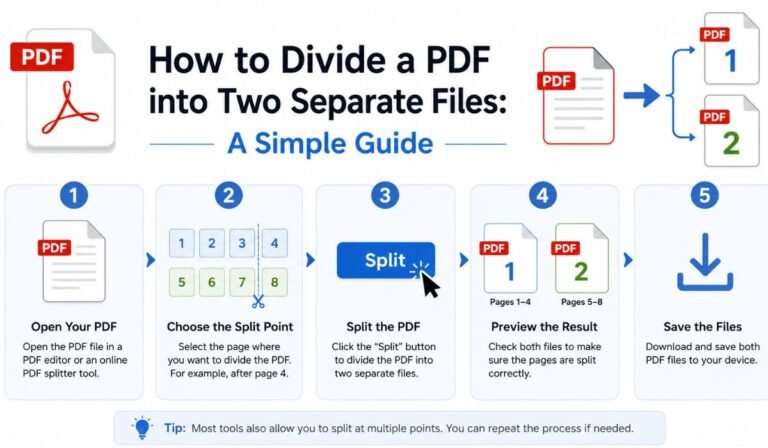
Nowadays, we use PDF files in our daily lives and work. This is mainly because PDF files have a standardized format, preventing issues like misaligned content when opened on different devices. However, sometimes you might only want to share a portion of a PDF file, or you might need to reorganize the document. In these cases, you might need to split the PDF file into two or more smaller files.
Actually, this isn’t difficult; many online PDF tools can do this. Of course, there are also many PDF tools on the market that can help you easily and quickly split files into multiple smaller PDF files. In this article, I will introduce several different methods; choose the one that suits you best and try splitting your PDF file!
Why Split a PDF?
So, in what situations do we need to split PDF files?
1. Share only a portion of the content – Instead of sending the entire file, select only a few specific pages.
2. Maintain file logic – Large PDF files are cumbersome to manage; splitting them into multiple smaller PDF files makes management much easier.
3. Split it into chapters or sections – Ideal for books, reports, or study materials.
4. Reduce file size – Smaller files upload and send faster.
5. Improve team collaboration efficiency – Different people can be responsible for different parts without interfering with each other.
There are actually many other situations; these are just some of the more common ones.
Method 1: Split a PDF Using JOPDF
JOPDF is a completely free PDF tool that includes features for editing, converting, merging, compressing, and organizing documents. Among these functions, splitting PDFs is a straightforward task and can be done quickly.
How to Split a PDF File Using JOPDF
Step 1: Open the PDF File
Run JOPDF and import the file you want to split.
Step 2: Click the “Pages” button
Find the “Split” function and choose whether to split the entire PDF file or split individual pages.
Step 3: Save the split PDF file.
Alternatively, you can find “Batch Process” on the main page. After installing the plugin, find “Split PDF”.
You can typically choose from the following options:
Split by page number (e.g., starting from page 5)
To split a file into two parts, simply select the pages of the document you want to split.
Click “Split,” and the software will generate two separate PDF files.
One of the advantages of tools like JOPDF is that they integrate multiple PDF functions into one program, so you can edit, compress, or merge the split file without switching to another program.
Method 2: Try a Free Online PDF Splitter
Online PDF tools are also a good option, especially if you only occasionally need to split files.
How to use them:
- Upload your PDF file.
- Select the pages you want to split.
- Decide how to split the file.
- Download the processed PDF file.
These tools are very easy to use and don’t require any software installation. However, they may have file size limits, and you need to be extra careful when uploading files containing sensitive content.
Method 3: Use Your PDF Reader’s Built-In Features
Believe it or not, some PDF readers come with basic page extraction capabilities. While it might not always be immediately obvious, it’s worth a try.
The steps are very simple:
1. Open the PDF file.
2. Select the pages you want to extract.
3. Save them as a new file.
If needed, you can repeat this process to create a second file. While this is feasible, frankly, it can be a bit cumbersome and time-consuming for large files.
When Should You Skip Splitting?
While the split function is applicable in many situations, splitting PDF files is often not the optimal choice in certain contexts. For example:
• Many legal documents or business contracts require maintaining the integrity and logical flow of the content.
• Improper splitting can disrupt the continuity of content within the document, hindering smooth reading.
• Unnecessary s plitting ultimately leads to managing multiple PDF files, making the process more cumbersome.
In these situations, you can add annotations or explanations to the PDF file, which will not only preserve the document’s integrity but also make it easier to read.
Additional Features That Can Help
Whether or not you choose to split your PDF files, the following features are also very useful:
- Merge PDFs (if you need to merge files again)
- Compress PDFs (to reduce file size without compromising file quality)
- File encryption (for protecting private content)
- Format conversion (when you need an editable version)
Tools like JOPDF—a free PDF editor—include all of these, which can really simplify document management.
Final Thoughts
Mastering the skill of splitting PDF documents into two or more parts is incredibly useful. Whether you need to organize PDF files or share portions of content, splitting files can make your work much easier and more convenient.
Different methods can be chosen depending on your needs—online tools are suitable for quick processing, built-in readers are suitable for basic extraction, while professional software like JOPDF offers more powerful and comprehensive management. The most important thing is to choose a method that ensures both document quality and a smooth workflow.
Once you choose the right method or tool for you, managing PDF files becomes a breeze!
