
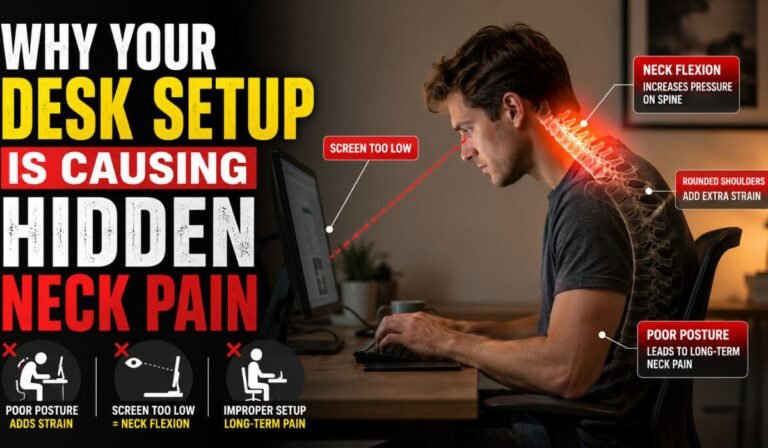
In our modern digital economy, the office workstation has become the primary physical landscape where a vast majority of working professionals spend their waking hours. Individuals sit for eight, ten, or twelve hours a day, focused intently on software interfaces, answering communications, and executing complex data analysis. Because these tasks require immense cognitive focus, it is incredibly easy to separate yourself from your physical environment, paying zero attention to the subtle ergonomics of your workstation.
However, the human body is a dynamic mechanical system designed for continuous movement, not static, repetitive positioning. Many professionals suffer from persistent, aching discomfort at the base of their skull, stiffness across the shoulders, and sharp radiating pain along the cervical spine. They frequently attribute this physical toll to raw stress, aging, or sleeping at an awkward angle, completely ignoring the true culprit: their daily desk setup. A poorly engineered workspace forces your body into unnatural, sustained postural compensations that quietly overload your muscles, leading directly to chronic neck strain and joint degradation.
1. The Physics of Forward Head Posture and Gravitational Leverage
The fundamental mechanical driver behind hidden neck pain is a structural misalignment known as forward head posture, or colloquially, “tech neck.” In a neutral, vertically aligned posture, the human head—which weighs approximately ten to twelve pounds—sits cleanly balanced atop the cervical spine, requiring minimal muscular effort to stay upright.
When an individual’s desk geometry is misaligned, they subconsciously tilt their head forward to bring their eyes closer to their work. The moment the head shifts forward out of a clean vertical alignment, the laws of leverage alter the forces acting on the spine. For every single inch your head moves forward from your shoulders, the relative weight of your head increases by an additional ten pounds. If your computer screen is positioned too far away or too low, forcing a three-inch forward lean, your neck muscles are suddenly tasked with supporting a thirty-to-forty-pound load for hours on end. This continuous, isometric strain starves the muscle tissues of fresh, oxygenated blood, leading to localized inflammation, painful knots, and premature disc degeneration.
2. Monitor Height Discrepancies and the Angle of Visual Focus
The primary driver behind this destructive forward lean is an improper relationship between eye level and the top of the digital display monitor. Most professionals place their monitors directly on their desk surfaces using the basic plastic stands provided by the manufacturer. Consequently, the screen sits significantly below the natural horizontal line of sight.
To keep the screen in view, you are forced to continuously flex your neck downward. Over several weeks, this constant downward gaze stretches the ligaments at the back of the neck while compressing the small facet joints along the cervical vertebrae. To neutralize this structural strain, your screen must be raised until the top third of the display is positioned at exact eye level, allowing you to scan the entire digital canvas simply by moving your eyes rather than bending your spine.
3. The Subtle Geometric Adjustments That Save Your Spine
Achieving an ergonomically balanced workspace requires meticulous control over every physical interface of the desk setup. It is not enough to simply elevate a screen; you must also evaluate the structural mounting hardware, the depth of the desk surface, and the exact positioning of input peripherals like keyboards and dual monitors.
When configuring monitor arms or desktop storage configurations, tiny adjustments in hardware elevation dictate whether your spine rests comfortably or experiences continuous mechanical friction. This level of precise spatial tuning is especially critical when setting up complex, heavy-duty industrial or technical workstation assemblies. To lift substantial monitoring gear or specialized laboratory displays to an exact, unyielding height, engineers and ergonomic technicians cannot rely on flimsy plastic risers that warp under a heavy load. Instead, they integrate heavy-duty mechanical hardware, using rigid metal components such as machined plates and thick spacers to build stable, custom-leveled foundations beneath mounting brackets. Using dense, highly precise spacing blocks ensures that heavy screens remain completely parallel to your field of vision, preventing the subtle screen dipping that slowly coaxes your chin downward and eliminating the silent micro-strain that damages your upper back muscles over long shifts.
4. Unmanaged Armrest Geometry and Scapular Elevation
A less obvious but highly destructive contributor to desk-induced neck pain is the misconfiguration of chair armrests and keyboard placement. Your shoulders and neck function as an integrated structural network, where muscles like the trapezius and levator scapulae anchor directly from the shoulder blades straight up into the cervical vertebrae.
When office chair armrests are positioned too high, they continuously push your shoulders upward into a perpetual shrug. Conversely, if the armrests are too low or positioned too far away from the desk, your arms hang unsupported, forcing the neck and shoulder muscles to pull upward continuously to support the heavy weight of your limbs as you type. This constant, unmanaged muscular activation creates a condition of chronic hypertonicity—a state where muscle fibers remain locked in a semi-contracted state, triggering severe tension headaches and unremitting neck pain that persists long after you close your computer for the evening.
Conclusion
Persistent neck pain is rarely a random, unavoidable symptom of working a modern office job; it is a direct, logical physical consequence of unmanaged workstation geometry. By moving away from passive office habits and actively regulating your screen height, deploying heavy-duty spacing components to anchor your display brackets, and tuning armrest leverage points, you can successfully insulate your body from structural decay. Protecting your cervical alignment ensures that you can navigate your professional demands not from a state of chronic physical exhaustion, but from a resilient foundation of authentic energy, fluid mobility, and lasting comfort.
