
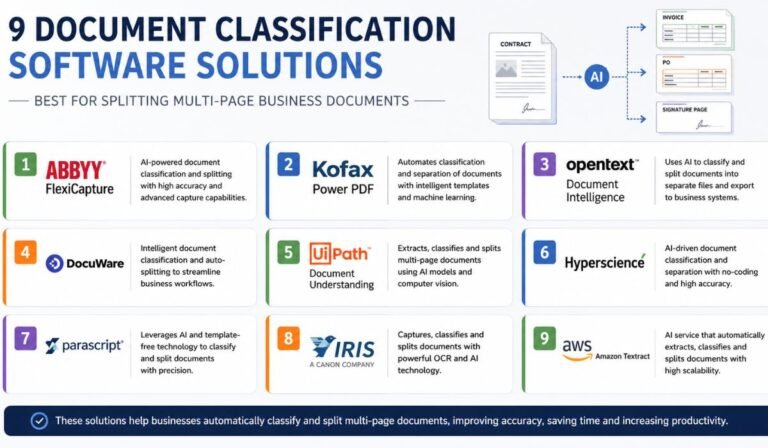
Document classification is a key investment for enterprises focused on scaling automation. As organizations increase spending on AI, the leaders are those who first establish a solid data foundation. This begins with accurately identifying every incoming document. When you classify documents correctly at the point of entry, all downstream systems, from your ERP to your compliance workflows, operate with cleaner, more reliable data.
This is where competitive separation occurs for mid-market and enterprise buyers. Automating document triage can reduce manual processing costs by 30% to 40% and shorten document-handling times from days to seconds. Teams that still manually sort mixed document types fall further behind, while those using an AI-driven classification route files faster and reduce error rates. In unmanaged systems, approximately 7.5% of all paper documents are lost completely. The right platform transforms a routine back-office task into a strategic advantage, freeing people for higher-value work.
Choosing the right tool involves matching its strengths to your document mix, accuracy targets, and existing tech stack. To guide that decision, here are the best document classification tools for enterprises that organize mixed document types.
1. ABBYY
Handling files containing multiple documents, such as invoices or purchase orders, can be difficult without the right tools. To streamline this process and ensure precise data extraction, ABBYY offers advanced solutions for document splitting and classification. ABBYY automates the splitting of large files into individual documents using methods like blank page separation, barcodes, or pre-trained and custom-trained machine learning models. These models identify markers to determine where one document ends and the next begins, offering a custom solution for complex workflows.
Beyond splitting files, ABBYY Document AI uses advanced classification models to accurately identify and categorize documents. The system uses image processing, natural language processing (NLP), and multimodal machine learning algorithms to process various documents, including driver’s licenses, tax forms, and contracts. It evaluates each document’s type, appearance, and content, regardless of language, to ensure proper categorization. With ABBYY IDP, businesses can automate labor-intensive tasks, reduce manual errors, and optimize data handling for higher efficiency.
2. Extend AI
Extend AI is a highly specialized platform built specifically to handle high-volume batch ingestion and document splitting for modern engineering and operations teams. It is a favorite for developers who want to avoid building fragile, custom regex rules to parse files.
Extend utilizes multi-modal Vision-Language Models (VLMs) to execute content-based page splitting. Instead of relying on a fixed page count, the platform looks for semantic shifts and unique identifiers, such as changing invoice numbers or distinct vendor names across a continuous page stream. It also features intelligent merging, meaning if a single document accidentally gets split across separate upload chunks, the system automatically patches it back together.
3. Hypatos
Hypatos approaches multi-page splitting by treating documents as multi-dimensional 2D matrices rather than plain text streams. This machine-vision approach allows its autonomous AI agents to map out exactly how structural components (like corporate logos, closing terms, or signature blocks) are positioned across multiple sheets.
For large enterprises, Hypatos acts as a self-governing gatekeeper. If a third-party vendor submits an unstructured 100-page transaction bundle, Hypatos automatically splits the pages into clean, isolated categories. Its agentic AI can then immediately route the split files into your ERP or autonomously reject non-compliant pages right at the source.
4. Klippa
Klippa is developed on their state-of-the-art DocHorizon platform and provides a super-fast, automated document classification system that can dissect and label documents in just a few seconds. To accomplish this, Klippa uses a well-balanced combination of computer vision and natural language processing (NLP) technology to understand and manage texts.
Klippa excels in its document splitting techniques, especially when processing lengthy documents with different types of files, languages, or international formatting standards. Since it thoroughly analyzes files, it can break apart a merged document while at the same time it checks each section for compliance, personal data, or financial fraud, potentially reducing the processing costs of back-office teams by 70%.
5. Parascript
Parascript offers an extremely customizable environment along with its proprietary Cascade Classifier tool. A major differentiator is Parascript’s capability to organize, categorize, and partition multi-page documents even before performing optical character recognition (OCR).
Instead of waiting to process every line of text, Parascript scans the visual attributes and glyphs of incoming documents. It can instantly recognize where a new document starts simply by identifying changes in visual themes, layout designs, or the presence of specific corporate headers. This zero-preparation approach makes it incredibly fast for processing massive, unindexed mailrooms.
Why Contextual Splitting Beats Rigid Rules: Legacy systems often split documents by fixed numbers (e.g., “split every 3 pages”). However, if one invoice is two pages and the next is four, fixed splitting corrupts your data. Semantic splitting reads the meaning of the pages, ensuring every record is sliced exactly where it naturally ends.
6. UiPath Document Understanding
As a core component of the UiPath orchestration platform, this tool is built for organizations that want to tie document splitting into end-to-end business automation. UiPath uses a blend of machine learning and layout analysis to recognize where multi-page packages need to be severed. Once the document is split, UiPath’s robotic software instantly launches downstream tasks, like entering invoice details into an accounting program or filing a contract into a secure directory.
7. Google Cloud Document AI
Google’s platform includes a powerful “Custom Splitter” processor designed explicitly to untangle composite files. Powered by Google’s generative AI infrastructure, the Custom Splitter can be trained using few-shot learning, meaning you only need to show it a handful of example document packages to get highly accurate splitting bounds. It continuously learns from active human feedback, making it a highly scalable option for global corporations dealing with multi-language paperwork.
8. Microsoft Azure AI Document Intelligence
An excellent choice for companies utilizing the Microsoft ecosystem, Azure’s document intelligence service uses cloud-based machine learning to identify document boundaries and map metadata. It can scan an incoming document bundle, determine the specific classification of each internal page chunk, and cleanly export the structured output straight into enterprise applications like SharePoint or custom internal databases.
9. Rossum
Rossum is an AI-first transactional document automation platform built to conquer massive document chaos. It uses an adaptive layout-neutral approach to read files, making it highly effective at handling semi-structured documents like international shipping slips and mixed invoices. Rossum smoothly handles multi-page files by identifying document breaks based on contextual clues, allowing teams to dramatically increase their straight-through processing rates without heavy setup times.
| Tool | Key features | Strengths | Best for |
| ABBYY | Uses blank page separation, barcodes, and machine learning for splitting; advanced classification models. | High customization, supports extensive document types and languages. | Enterprises needing versatile, multi-language document classification and structured workflows. |
| Extend AI | Multi-modal Vision-Language Models enable semantic splitting and intelligent merging. | Developer-friendly, eliminates reliance on regex rules, handles high-volume batch processes. | Engineering teams requiring precise splitting in continuous document streams. |
| Hypatos | Machine vision-based splitting with AI agents mapping document structure and visual design. | Strong handling of unstructured, multi-page bundles; autonomously routes or rejects documents. | Large enterprises needing automated file organization and error rejection. |
| Klippa | Combines computer vision and NLP for rapid splitting; checks for compliance, fraud, and sensitive data. | Fast and accurate document dissection; excels in international standards handling. | Organizations processing international documents and ensuring detailed compliance checks. |
| Parascript | Cascade Classifier scans visual attributes for splitting before optical character recognition (OCR) (OCR); zero-preparation approach. | Extremely fast for unindexed environments; adaptable for large volumes. | Massive mailrooms and industries handling visually design-heavy documents. |
| UiPath Document Understanding | Layout analysis and machine learning for splitting; integrates seamlessly with robotic process automation. | Simplifies downstream automation by launching tasks post-splitting. | Businesses are tying document classification into end-to-end automation workflows. |
| Google Cloud Document AI | Few-shot learning for custom splitting; learns continuously from user feedback. | Scalable for multilingual, global paperwork; incorporates powerful generative AI capabilities. | Corporations managing complex, multi-language document needs. |
| Microsoft Azure AI Document Intelligence | Cloud-based ML identifies boundaries and exports structured data. | Best fit for the Microsoft ecosystem; strong metadata classification. | Enterprises relying on Microsoft tools like SharePoint or internal Microsoft databases. |
| Rossum | Adaptive, layout-neutral AI processes semi-structured documents; context-based splitting. | Minimizes setup time; boosts straight-through processing rates for mixed documents. | Teams managing semi-structured documents like international invoices and shipping slips. |
Conclusion
Manually separating pages or inserting physical barcode sheets into document stacks is an expensive operational bottleneck. Modern Document Classification Software turns document splitting into an intelligent, automated science. By employing platforms that understand the visual layout and semantic meaning of your files, your enterprise can cleanly isolate every single piece of incoming data, ensuring your automation pipeline runs smoothly from the very first page.
